In this post I share a Chrome Plugin for a Launcher e.g. Executor (my preferred one), Launchy, Fluent Search or Listary.
(It is implemented in AutoHotkey but shared as small executable.)


About
Chromy allows you to trigger the Chrome Command bar from your Application Launcher, means without having to open a Chrome window.
It supports also multiple Chrome profiles.
Download
You can download the .exe here Chromy.exe or the directly the ahk sources ahk/Chromy.ahk.
Usage
Simply add a keyword in your Launcher redirecting to the Chromy.exe

You can also pass a specific Profile to be used. Pretty useful if you redirect to a Chrome extension only installed in one Chrome Profile.
Executor
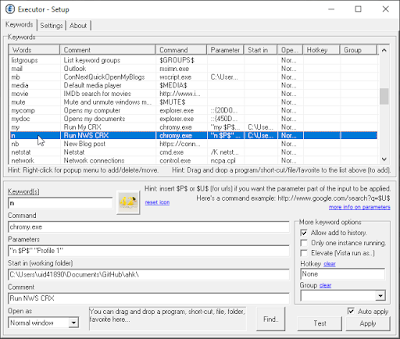
In Executor it looks like this:

Simply add as second argument "Profile Shortcut Name" between quotes.
Profile Shortcut Name i.e. what you see when hovering over the profile picture icon in Chrome.
Example above "n $P$" "Profile Shortcut Name" (n is the keyword used by the Chrome Extension)
Listary
In Listary it looks like this in the Options-> Commands, add a new command:

Source
Source code is available here: ahk/Chromy.ahk
Changelog
2026-01: Updated: Profile argument is the Profile Shortcut Name i.e. what you see when hovering over the profile picture icon in Chrome.

No comments:
Post a Comment